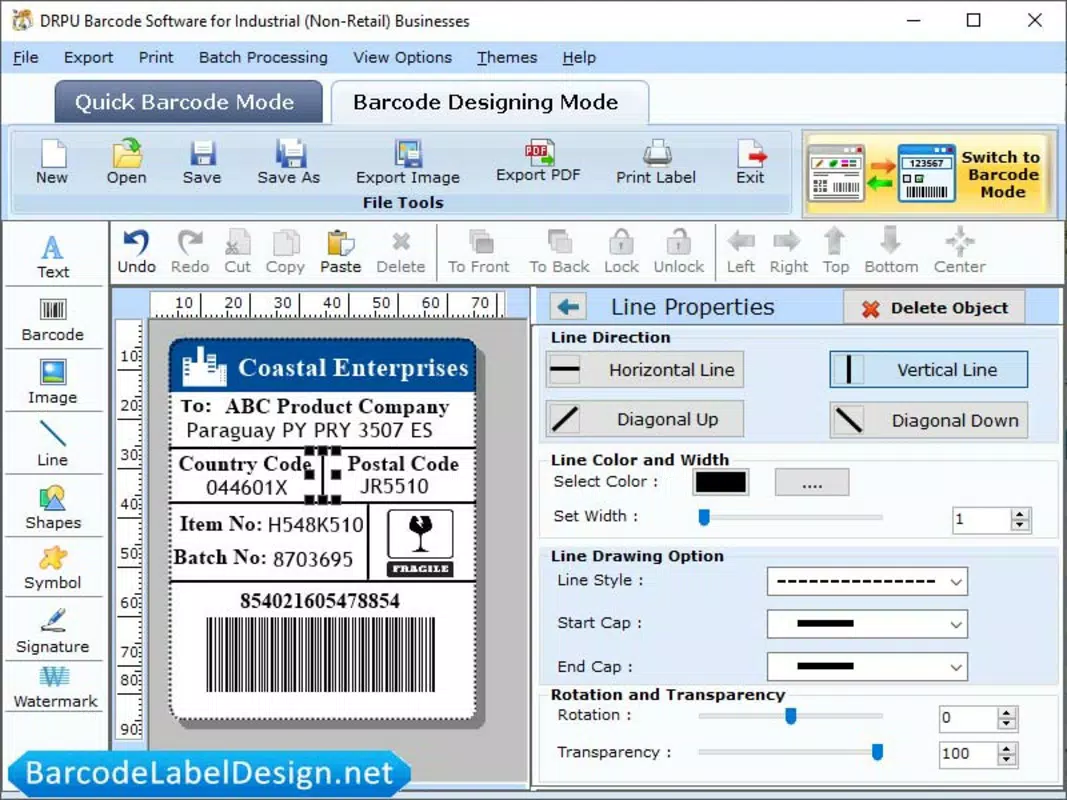

Download Warehouse Barcode Design – warehouse, barcode, design, sticker, label, create, customize, online, tool, software
Overview
Warehouse Barcode Design is a web-based software tool developed specifically for professionals in the warehousing and logistics sectors. Its primary purpose is to streamline the creation of barcode stickers and labels through a simple, intuitive interface. The application enables users to generate high-quality barcode designs without requiring prior design experience or technical expertise. This makes it particularly valuable for warehouse managers, inventory clerks, and small business operators who need to produce consistent, branded labels for products and shipments.
The app addresses common challenges in inventory management, such as inefficient label creation, inconsistent formatting, and reliance on external design tools. By offering a dedicated online solution, it reduces time spent on label preparation and improves labeling accuracy. The tool is especially beneficial in fast-paced environments where rapid, on-demand label generation is essential for operational efficiency.
Although the developer did not provide additional background details, the app’s focus on usability and functionality suggests a targeted development approach for real-world warehouse workflows. Its web-based nature allows access from any device with a browser, supporting remote and mobile operations. This flexibility enhances its relevance in modern supply chains where digital tools are increasingly integrated into daily processes.
With a free pricing model and a lightweight 10 MB size, the application is accessible to a broad audience. It contributes to the growing ecosystem of productivity tools tailored for logistics and inventory management, offering a practical solution for digital labeling needs.
Key Features & Functionality
- Multiple Design Objects: Users can incorporate lines, arcs, shapes, and text into their barcode designs. This flexibility allows for the creation of complex, multi-element labels tailored to specific product types or warehouse requirements.
- User-Friendly Interface: The interface is designed for ease of navigation, enabling even non-designers to create professional-looking labels without training. This lowers the barrier to entry for teams with limited technical skills.
- Online Barcode Maker: As a web-based tool, Warehouse Barcode Design does not require installation. Users can access it from any device with internet connectivity, making it ideal for on-site or remote label creation.
- Customizable Stickers: Customization options include color schemes, font styles, and layout adjustments. This ensures that barcode stickers align with brand identity and meet internal labeling standards.
- No Technical Skills Required: The tool is built for inclusivity, allowing users of all experience levels to generate accurate and visually consistent barcodes quickly and reliably.
For example, a warehouse employee can create a product label with a barcode, product name, and company logo in under two minutes using the available tools. Another use case involves generating a batch of labels for a shipment with varying product codes and custom text fields. The application’s modular design supports such scenarios efficiently, enhancing workflow continuity and reducing labeling errors.
Interface, UX & Performance
The user interface of Warehouse Barcode Design is clean and logically structured, prioritizing accessibility and ease of use. Navigation is straightforward, with tools and options grouped by function, minimizing user confusion. The visual layout emphasizes clarity, allowing users to focus on design elements without distractions.
Although the developer did not list formal performance metrics, the application’s web-based architecture suggests responsiveness across a range of devices, including smartphones, tablets, and desktops. Users can expect smooth interactions when adding or adjusting design elements, with minimal lag during standard operations.
Stability appears to be a core design principle, as the tool functions without requiring downloads or installations. This reduces the risk of compatibility issues and ensures consistent behavior across different browsers and operating systems. However, performance may vary depending on internet speed and device capabilities, particularly on older or low-memory devices.
Overall, the user experience is optimized for quick task completion. The tool’s simplicity does not compromise functionality, offering a balance between ease of use and design control. This makes it suitable for both occasional users and those who generate labels regularly.
Platform Compatibility & Technical Requirements
Warehouse Barcode Design is a web-based application, accessible through any modern browser on supported devices. The platform is not tied to a specific operating system, allowing use across Android, iOS, Windows, and macOS environments. This cross-platform availability enhances its utility in diverse work environments.
The application has a file size of 10 MB, which is minimal and consistent with lightweight web tools. This suggests efficient code and fast loading times, especially on stable internet connections. The version is listed as 1.0.0, indicating a stable initial release with full functionality.
The developer did not specify minimum OS requirements or browser compatibility details. As such, users are advised to ensure their device supports current web standards and has a stable internet connection. Compatibility with older browsers or legacy systems cannot be confirmed.
Pros and Cons
Pros
- Free to use with no hidden costs
- Web-based access eliminates installation requirements
- Intuitive interface suitable for non-designers
- Supports customizable labels with multiple design elements
- Lightweight size ensures fast loading and minimal resource use
Cons
- Specific technical requirements were not listed
- Compatibility with older devices or browsers is uncertain
- No offline functionality available
- Performance may depend on internet speed and device capability
- Developer background and support details were not disclosed
FAQ
Is Warehouse Barcode Design safe to use?
Yes, as a web-based tool, it does not require installation and runs in a browser environment, reducing the risk of malware or system interference. Users should ensure they access the official website to maintain security.
Can I use this tool without an internet connection?
No, the application requires an active internet connection to function, as it is hosted online and does not offer offline capabilities.
Is there a mobile app version available?
The tool is web-based and accessible from smartphones and tablets via browser, but no dedicated mobile app was mentioned in the provided information.
How often is the tool updated?
The release date is listed as October 11, 2023. Specific update frequency or future release plans were not disclosed by the developer.
Can I export my barcode designs?
While export functionality was not explicitly described, the ability to generate and customize labels implies that users can likely download or print their designs for physical use.
Final Thoughts
Warehouse Barcode Design delivers a focused, practical solution for professionals in warehousing and inventory management. Its web-based nature, combined with a user-friendly interface and customizable design tools, makes it a valuable asset for teams seeking to improve labeling efficiency without technical overhead. The absence of installation requirements and the free pricing model enhance its accessibility, particularly for small to mid-sized operations.
While the lack of detailed technical specifications and developer information limits deeper evaluation, the app performs its core function effectively. It is ideal for users who need to create branded, accurate barcode stickers quickly and consistently. The tool’s simplicity and functionality offer strong value in a niche but essential workflow.
For anyone involved in warehouse operations, inventory tracking, or product labeling, this app represents a streamlined way to manage digital labeling tasks. Download Warehouse Barcode Design now.


